

Someone in your next website meeting will suggest going headless, usually because it sounds faster, more modern, and better for SEO. None of those is guaranteed. What the headless CMS vs traditional CMS choice really changes is who builds and owns your website’s front end.
The difference between a headless CMS and a traditional CMS is where the website gets built. A traditional CMS stores your content and renders the web pages in one application. A headless CMS only stores and manages content, then sends it through an API to separately built frontends, such as a website, a mobile app, or an in-store screen.
Below, we trace one page request through each architecture, price a five-editor team on October 2026 list prices, and show exactly where SEO work moves when you decouple. You’ll finish with a two-question test that tells you which architecture fits your team now, and what would have to change for the answer to flip.
Quick verdict by reader type:
- Choose a traditional CMS if one website is your main channel and marketers need to change pages without developer tickets.
- Choose a headless CMS if the same content must feed several frontends and developers will own the frontend after launch.
- Choose a hybrid CMS or headless WordPress if editors need page building today and you need an API for a second channel later.
- Don’t go headless for speed or SEO alone. Both come from how the frontend is built, and a well-built traditional site gets them too.
What is a traditional CMS?
A traditional CMS is a content management system where the editor, the content database, and the website’s templates live in one application, so the same software that stores a page also renders it for visitors. WordPress, Drupal, and Joomla are traditional CMSs, also called coupled or monolithic CMSs.
That bundling is why the model still runs most of the web. As of late October 2026, W3Techs reports WordPress on 39.6% of all websites, which is 58.3% of sites whose CMS it can identify. Hosted builders such as Wix, Squarespace, and Webflow belong to the same coupled family, even though you never see a server.
Traditional CMS features
- Themes and templates that control layout across the whole site
- A visual or block editor with true-to-page live preview
- A plugin or module ecosystem for SEO, forms, ecommerce, and caching
- Built-in URL routing, menus, and page hierarchy
- Media library, user roles, and revision history
- One-click installs on mainstream hosting
The feature that matters most rarely appears on lists: the editor and the live site share one system, so what an editor previews is what ships.
What is a headless CMS?
A headless CMS is a content management system with no built-in frontend. It stores content as structured data, such as titles, prices, and author fields, and delivers it through an API (REST or GraphQL) to any frontend your developers build. Contentful, Sanity, Strapi, Storyblok, and Payload are common examples.
The “head” is the presentation layer, the part visitors see. Removing it changes the unit of content. You stop writing pages and start filling fields that any channel can reassemble, so one product description can feed the website, the app, and a store display without anyone copying it.
Headless CMS features
- Content modeling: you define custom content types and fields in a schema
- Delivery APIs in REST, GraphQL, or a vendor query language such as Sanity’s GROQ
- A CDN in front of the API for fast, cached reads
- Webhooks that notify your frontend the moment content is published
- Field-level localization, environments, and version history
- SDKs for frameworks such as Next.js, Nuxt, and Astro
- Visual editing and live preview on some platforms, once developers wire them in
How does each CMS work? One page request, traced
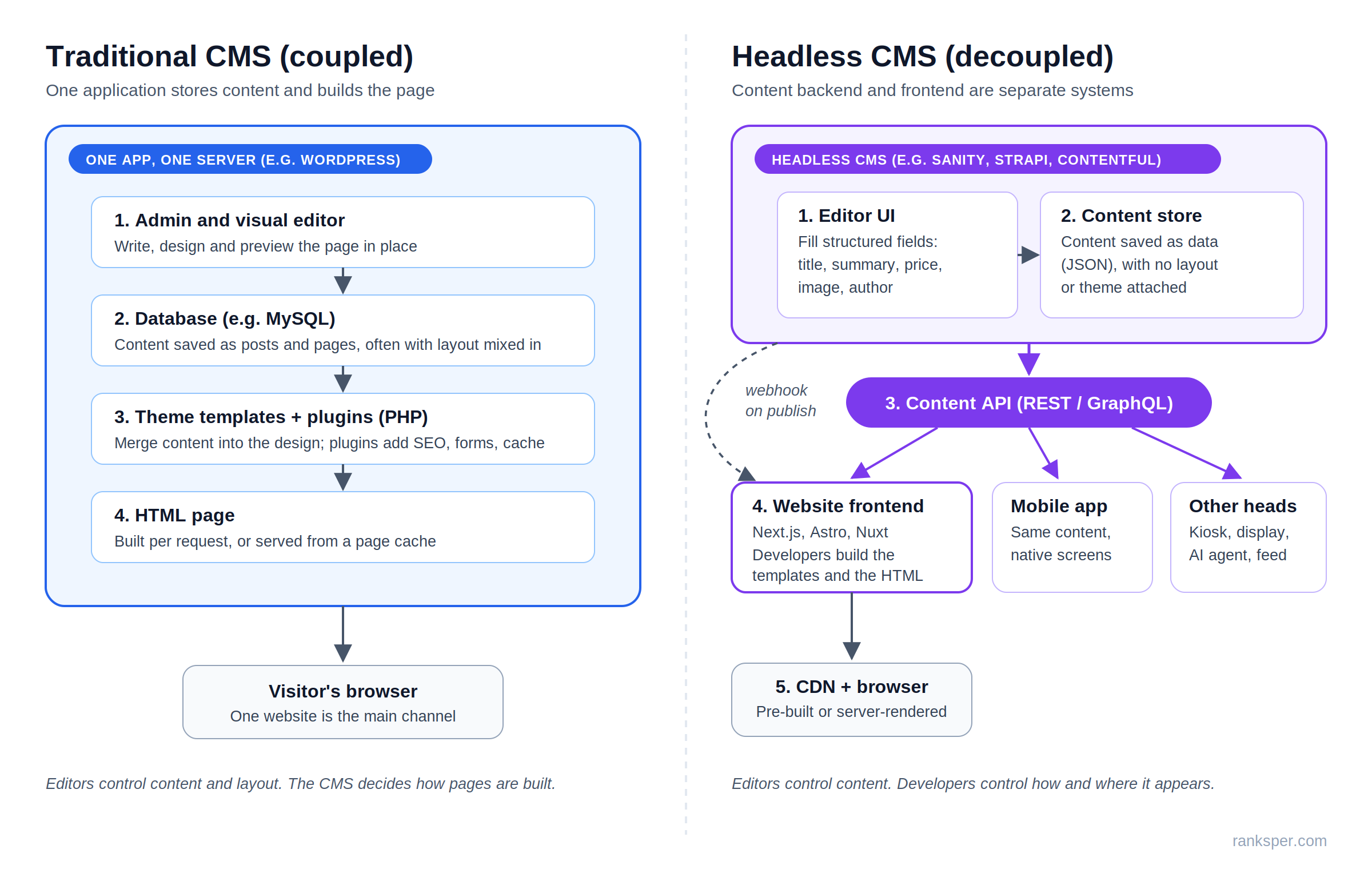
Architecture debates get abstract fast. The clearest way to see the difference is to follow one request for /pricing through both systems, because where the HTML gets made decides your speed, your SEO risk, and your security exposure.
Diagram comparing a traditional CMS, where one application stores content and renders HTML for one website, with a headless CMS that sends structured content through an API to a website frontend, a mobile app, and other channels
How a traditional CMS builds a page
- A visitor’s browser requests yoursite.com/pricing.
- The web server passes the request to the CMS (PHP, for WordPress).
- The CMS queries its database for the page’s content and settings.
- The active theme’s template merges that content into the layout.
- Plugins hook in, adding meta tags, schema, forms, or tracking scripts.
- The server returns finished HTML, and a page cache may keep a copy.
Steps 2 to 5 run on every uncached request. That’s why plugin count and hosting quality matter so much on WordPress: each plugin can add database queries and scripts to the critical path. Page caching skips those steps for repeat visits, which is how well-run traditional sites stay fast.
How a headless CMS builds a page
- An editor fills in structured fields and clicks publish.
- The CMS saves the entry as data (usually JSON) and fires a webhook.
- The webhook tells the frontend to rebuild or revalidate affected pages.
- The frontend fetches the content from the CMS’s API.
- The frontend framework renders HTML from its own templates.
- A CDN serves that HTML to visitors, and the CMS never meets them.
Notice what moved. Much of the work now happens at publish time instead of visit time, and the templates live in your developers’ codebase instead of the CMS. The admin can sit on a separate domain the public never touches. That shrinks the attack surface, but it adds API tokens, webhook endpoints, and preview secrets that someone has to protect.
Rendering mode decides speed and SEO more than the CMS does
A headless frontend can produce HTML in three main ways, and that choice matters more than the CMS logo.
| Rendering mode | When HTML is created | SEO risk | Good for |
|---|---|---|---|
| Static generation (SSG) | At build or publish time | Low | Blogs, service pages, docs |
| Server-side rendering (SSR) | On each request, on the server | Low | Prices, stock, personalized pages |
| Client-side rendering (CSR) | In the browser, via JavaScript | Higher | Logged-in app screens |
Many frameworks also offer incremental regeneration, which rebuilds individual static pages after publish instead of the whole site.
Google can render JavaScript, but its JavaScript SEO documentation explains that pages wait in a rendering queue that can take longer than a few seconds. Google still recommends server-side rendering or pre-rendering, because it’s faster for users and crawlers and because not every bot can run JavaScript. A traditional CMS returns full HTML by default, so it starts on the safe side of this table. A headless site lands wherever its developers put it.
Headless CMS vs traditional CMS: side-by-side comparison
Comparing a CMS vs headless CMS on paper? Read past the architecture row. The rows below it decide budgets and workloads.
| Factor | Traditional CMS | Headless CMS |
|---|---|---|
| Architecture | Content and presentation in one app | Content backend, frontend built separately |
| Who builds pages | Themes, page builders, editors | Developers, in a framework they choose |
| Editing and preview | Visual, true-to-page by default | Form fields; preview depends on the build |
| Time to launch | Days to weeks | Weeks to months |
| Channels | Website first, APIs possible | Any channel that can call an API |
| Performance | Hosting, caching, plugin load | Rendering mode and frontend code |
| SEO setup | Plugins handle meta, sitemaps, schema | Developers build each piece |
| Security surface | Public admin, plugins, themes | API tokens, webhooks, frontend packages |
| Cost shape | Hosting, plugins, upkeep | License plus ongoing developer time |
| Best for | One site run by marketers | Multichannel content, in-house developers |
Three rows decide most real projects: who builds pages, editing and preview, and cost shape. The rest follow from those.
Headless CMS pros and cons
A headless CMS buys you reach and frontend freedom, and you pay for it in engineering ownership. Here’s how that splits.
Benefits of a headless CMS (why teams use one)
One source, many channels. Content written once can feed the website, a native app, partner feeds, and AI agents without copy-paste. This is the core reason to go headless. Every other benefit is secondary.
Frontend freedom. Developers pick React, Next.js, Astro, or native mobile tools and aren’t bound by a CMS template language. A redesign doesn’t touch the content store, so you can replace the frontend without migrating content.
Content modeled like your business. Custom types such as product, location, case study, and FAQ, each with typed fields, keep content clean and reusable. That structure also gives the frontend clean data to turn into schema markup.
Independent scaling and a smaller public footprint. Traffic spikes hit the CDN and frontend, not the editing backend, and there’s no public login page or plugin stack on the live site.
Drawbacks of a headless CMS
You’re now running a software project. Someone has to build, host, monitor, and update the frontend for as long as the site exists. When the agency contract ends, that someone still needs to exist.
Editors lose layout control by default. A new page section usually means a developer ticket unless developers pre-built flexible blocks. If your growth model depends on fast landing page iteration, weigh this heavily, because it’s the cost your marketing team feels every week.
Preview has to be engineered. Live preview and visual editing exist on platforms like Sanity and Storyblok, but they only work after developers connect them to your frontend.
SEO basics aren’t included. Titles, canonicals, sitemaps, redirects, and schema need fields in the CMS and code in the frontend. The SEO section below lists them.
Metered bills and vendor exposure. SaaS plans meter seats, API requests, and bandwidth. Sanity’s Growth plan, for example, charges $1 per 25,000 API requests beyond the included quota. Your content model also lives inside a vendor’s platform: Salesforce closed its acquisition of Contentful on September 1, 2026, and one migration agency reports customers reviewing renewal terms and exit costs as a result.
Traditional CMS pros and cons
A traditional CMS trades flexibility for speed and editor independence. For a single website, that’s often the right trade.
Advantages of a traditional CMS
Fast, cheap launch. Install, choose a theme, publish. There’s no separate frontend project to fund.
Marketers own the whole page. Visual editing and preview are native, so content and layout changes ship without engineers.
A deep ecosystem. WordPress’s market share means plugins, themes, developers, and tutorials are easy to find, and so is help when something breaks.
SEO tooling out of the box. Plugins like Rank Math and Yoast SEO turn titles, meta descriptions, sitemaps, and schema into form fields, so most of an on-page SEO checklist becomes a setting instead of a sprint.
Disadvantages of a traditional CMS
Plugins are the main security risk. Patchstack’s State of WordPress Security in 2026 counted 11,334 new vulnerabilities in the WordPress ecosystem during 2025, and 91% were in plugins, not core. Its weighted median time from public disclosure to first mass exploitation was five hours. Every plugin you add is a dependency you have to patch quickly.
Performance degrades with sprawl. Page builders and plugins add scripts and queries. Good hosting and caching fix most of it. Neglect doesn’t.
Content is shaped like pages. Reusing a page’s content in an app means stripping layout markup out of it first.
Redesigns touch content. Builder markup often lives inside post content, so a redesign can turn into a content cleanup project.
Multichannel takes extra work. WordPress’s REST API and Drupal’s JSON:API expose content to other channels, but each extra channel still needs its own build.
Is a headless CMS better for SEO?
A headless CMS isn’t better or worse for SEO by itself. Rankings depend on what the frontend sends to crawlers: crawlable HTML, correct status codes, metadata, internal links, and speed. A traditional CMS ships most of these through plugins. A headless build ranks just as well only when developers implement each one deliberately.
The work moves from settings to engineering requirements. Before a headless site launches, confirm it ships:
- Server-rendered or static HTML for every indexable page
- Editable title, meta description, and Open Graph fields per entry
- Canonical tags, plus real 404 and 301 status codes
- An auto-updating XML sitemap and a robots.txt you control
- A redirect manager editors can use without a deploy
- Structured data generated from content fields
- hreflang tags if you publish in more than one language
- Required alt text fields in the content model
Our guide to how search engines crawl, render, and index pages explains why the render queue matters, and the technical SEO guide covers sitemaps, canonicals, and status codes in depth. On a traditional CMS, most of this list arrives with an SEO plugin. On a headless build, each line is a ticket, so write it into the statement of work, not a post-launch backlog.
How much does a headless CMS cost vs a traditional CMS?
A traditional CMS usually costs less for a single website: the software is often free, and you pay for hosting, premium plugins, and maintenance. A headless CMS costs a platform license (or self-hosting) plus the frontend your developers build and keep running. Licenses are easy to compare. The frontend is the line that’s hardest to estimate.
Traditional CMS pricing
WordPress and Drupal are free, open-source software. You pay for hosting, a domain, any premium themes or plugins, and someone’s time for updates and backups.
Entry hosting is cheap. At the time of writing, Hostinger’s entry WordPress plan in India was listed at ₹69 a month on a 48-month term, renewing at ₹289 a month (disclosure: we’re a certified Hostinger partner). Budget on the renewal rate, since that’s what you pay after the first term. At the enterprise end, traditional platforms such as Adobe Experience Manager and Sitecore are sold on quoted contracts.
Headless CMS pricing
| Platform | Free tier | First paid tier (list) | Priced by |
|---|---|---|---|
| Sanity | Up to 20 seats, 2 roles | Growth: $15 per seat/month | Seat |
| Storyblok | 1 seat | Growth: $99/month, 5 seats | Plan |
| Strapi | Self-hosted Community (MIT) | Cloud Starter: $35/month | Project |
| Prismic | 1 user | Starter: $10/month, billed annually | Plan |
| Contentstack | 3 users | Build: $29/month, 3 users | Plan |
| Contentful | 10 users | Lite: about $300/month, billed annually | Plan and space |
| Payload | Self-hosted (MIT) | Enterprise: custom | Contract |
Sources: Sanity’s pricing page, checked directly, and vendor list prices compiled in October 2026 by FocusReactive. Prices change often, so confirm before you sign. One catch on Strapi: the same compilation notes the Starter tier sleeps when idle and lacks automated backups, which makes Cloud Pro at $90 a month the realistic production tier.
Worked example: five editors, one marketing site
Say five people publish content and none of them should be an administrator. Here’s the monthly license at list price:
- Prismic Small: $25, billed annually, up to 7 users
- Sanity Growth: $75 (5 × $15), because the free plan’s 20 seats only come with Administrator and Viewer roles
- Storyblok Growth: $99, or $90.75 billed annually
- Contentstack Growth: $299, since Build tops out at 3 users
- Contentful Lite: about $300, billed annually
Same team, same job, a 12x spread, because vendors price by seat, plan, space, or project. Model your own team shape (seats, roles, locales, API volume) before you shortlist.
Then add what no license covers: frontend hosting, the initial frontend build, preview setup, the SEO requirements listed above, usage overages, and a developer on call for framework and dependency updates. The license is fixed; developer time grows with every new page type and change request, so for a single marketing site it’s the line to plan around. The same five editors on self-hosted WordPress pay nothing for software. Their costs grow through premium plugins and maintenance time instead.
What about hybrid CMS and headless WordPress?
The two categories are converging from both sides, and the middle ground is often the practical answer.
Is WordPress a headless CMS?
WordPress is a traditional CMS by default, because it stores content and renders pages through themes in one application. It can run headless: its built-in REST API, or the WPGraphQL plugin, lets a separate frontend fetch content. Going headless gives up themes, most visual plugins, and native preview.
For a team that already knows WordPress and wants a modern frontend, headless WordPress is the lowest-friction path, since editors keep a familiar admin while developers own the frontend. Expect to rebuild preview and to lean on plugins for structured fields.
Hybrid and decoupled CMS
A hybrid CMS gives editors page building and preview while also exposing content through APIs for other channels. Drupal ships a JSON:API module in core, and headless vendors have moved the other way: Sanity includes visual editing and page-building tools on every plan, and Storyblok is built around a visual editor. A decoupled CMS separates backend and frontend but still ships a default delivery layer, so you aren’t starting from a blank frontend.
Which is better, headless or traditional CMS? A two-question test
Neither headless nor traditional CMS is better in general. A traditional CMS is better when one website is the main channel and marketers need to control pages without developers. A headless CMS is better when several frontends share the same content and in-house developers will own the frontend after launch.
Two questions settle most decisions. Answer them for the next 18 months, not the next five years.
Question 1: How many heads will consume this content? Count funded, real channels: website, app, product UI, kiosks, partner feeds. “We might build an app someday” doesn’t count yet.
Question 2: Who owns the frontend after launch? Named in-house developers, a retained agency, or nobody. If the honest answer is nobody, headless becomes a liability the day the build contract ends.
| No developer owns the frontend | Developers own the frontend | |
|---|---|---|
| One channel | Traditional CMS | Traditional or hybrid; headless only for a specific frontend need |
| Several channels | Hybrid, or traditional with its API | Headless CMS |
Then apply the tie-breakers:
- Marketers change page layouts weekly: traditional, or headless with visual editing developers commit to maintaining
- Strict data residency or vendor-exit concerns: self-hosted options such as WordPress, Strapi, or Payload
- Heavy relational content (products, locations, many languages): headless or hybrid
- Budget is a subscription, not headcount: traditional
The best argument for going headless anyway
Headless advocates raise two fair points. First, visual editing has narrowed the editor gap, since several platforms now offer live preview and page building. Second, AI systems work best with structured content, so modeling content as data looks future-proof.
Both hold, with limits. Visual editing reduces developer dependency without removing it, because developers still build every block editors can drag in. And structure is a modeling choice, not an architecture: a WordPress site with custom post types and fields can output clean HTML and schema too. If your team will do the modeling work, it pays off in either system.
Frequently asked questions
Can I switch from a traditional CMS to a headless CMS later?
Yes. Content usually exports cleanly. The expensive parts are rebuilding the frontend, redirects, preview, and every SEO feature your plugins used to provide. Treat it as a full site migration: crawl the old site, map every URL to its new home, and compare indexing and rankings before and after launch.
Is a headless CMS faster than WordPress?
Not automatically. Statically generated pages served from a CDN are very fast, but a well-cached WordPress site also serves pre-built HTML. Headless sites can be slower when they ship heavy JavaScript or render in the browser. Speed comes from the rendering mode, hosting, and frontend code, not the CMS label.
Is a headless CMS more secure?
Its public attack surface is smaller, because the admin panel and plugins aren’t on the live site. Security moves rather than disappears, though. API tokens, preview endpoints, webhook secrets, and the frontend’s package dependencies all need managing, patching, and access control.
Do I need a developer to use a headless CMS?
You need one to set it up and to change layouts or add page components. Day-to-day publishing doesn’t need a developer once the content model and frontend exist. That’s why the deciding question is whether a developer will still be available after launch, not during it.
What are examples of headless and traditional CMSs?
Traditional CMS examples include WordPress, Drupal, and Joomla, plus hosted builders like Wix, Squarespace, and Webflow. Headless CMS examples include Contentful, Sanity, Strapi, Storyblok, Payload, Contentstack, Hygraph, Directus, and Prismic. Platforms that offer both page building and content APIs are usually called hybrid.
What to do next
The headless CMS vs traditional CMS decision isn’t about which architecture is more modern. It’s about whether you need more than one head, and whether someone will own it. If you’re choosing now, work through it in this order:
- List every channel that will use your content in the next 18 months.
- Name who will maintain the frontend after launch.
- Run the two-question matrix and shortlist two or three platforms.
- Price your real team shape: seats, roles, locales, and API volume.
- Write the SEO requirements into the build brief before development starts.
- Benchmark rankings and indexing before you migrate anything.
Changing CMS is a migration, and migrations are where rankings get lost. Our website SEO audit captures your current URLs, redirects, and technical baseline, so you can launch the new stack, headless or not, without losing the traffic you’ve already earned.

