

Most “best tools” lists for this topic are written by software vendors, and most of them rank their own product first. That works for discovering what exists. It doesn’t tell you what you need this quarter, and getting that wrong is expensive: Gartner’s 2025 Marketing Technology Survey found that teams actively use only 49% of the martech capabilities they pay for.
A digital marketing toolkit is the set of software you use to get found, publish, capture leads, and measure results online. At minimum that means a website, Google Search Console, an analytics tool, an email platform, a social scheduler, a design tool, and one AI assistant. What you add after that should depend on your stage, not on the length of someone’s list.
This guide sorts the toolkit into three stages (a free core, a growth layer, and an advanced layer) and names the specific limit that tells you it’s time to upgrade. It ends with a five question selection test that includes an exit plan, because 1,367 martech products dropped out of the 2026 landscape in a single year. You’ll leave with a stack sized to where you are and a rule for what to add next.
What is a digital marketing toolkit?
A digital marketing toolkit is the working set of software a business uses to attract, convert, and measure customers online. It typically covers nine jobs: website, SEO, analytics, email and CRM, social media, content creation, paid ads, automation, and AI assistance. A strong toolkit has one tool per job, and every tool feeds data back to your analytics.
What it isn’t: a bookmark folder of 75 apps. Each tool costs more than its subscription, because someone has to set it up, connect it, and check it. When Gartner asked marketing leaders what blocks them from using their stack, the most common answers were ecosystem complexity, customer data problems, and weak governance. None of those get better when you add another login.
Here are the nine jobs and the digital marketing tools that usually cover them:
| Job | What it answers | Free starting point | Common paid upgrade |
|---|---|---|---|
| Website | Where do visitors land and convert? | WordPress (you pay for hosting) | Managed hosting, builder plans |
| SEO | What do people search, and do we rank? | Google Search Console | Ahrefs, Semrush, SE Ranking |
| Analytics | Which channel drove the result? | GA4, Microsoft Clarity, Looker Studio | Funnel.io, Improvado |
| Email and CRM | Who are our leads, and who follows up? | Mailchimp, HubSpot free CRM | HubSpot Starter, ActiveCampaign, Klaviyo |
| Social media | Are we posting consistently? | Buffer free plan | Buffer paid, Hootsuite, Sprout Social |
| Content creation | Can we produce assets fast? | Canva free, Hemingway Editor | Canva Pro, Descript, Surfer SEO |
| Paid ads | Which searches and audiences convert? | Google Ads, Meta Ads Manager | Third-party PPC tools |
| Automation | What repetitive work can run itself? | Zapier free (two-step Zaps) | Zapier paid, native CRM workflows |
| AI assistance | Can we draft and analyze faster? | ChatGPT, Claude, Gemini free tiers | Paid assistant plans, embedded AI |
Toolkit at a glance: basic, growth, and advanced
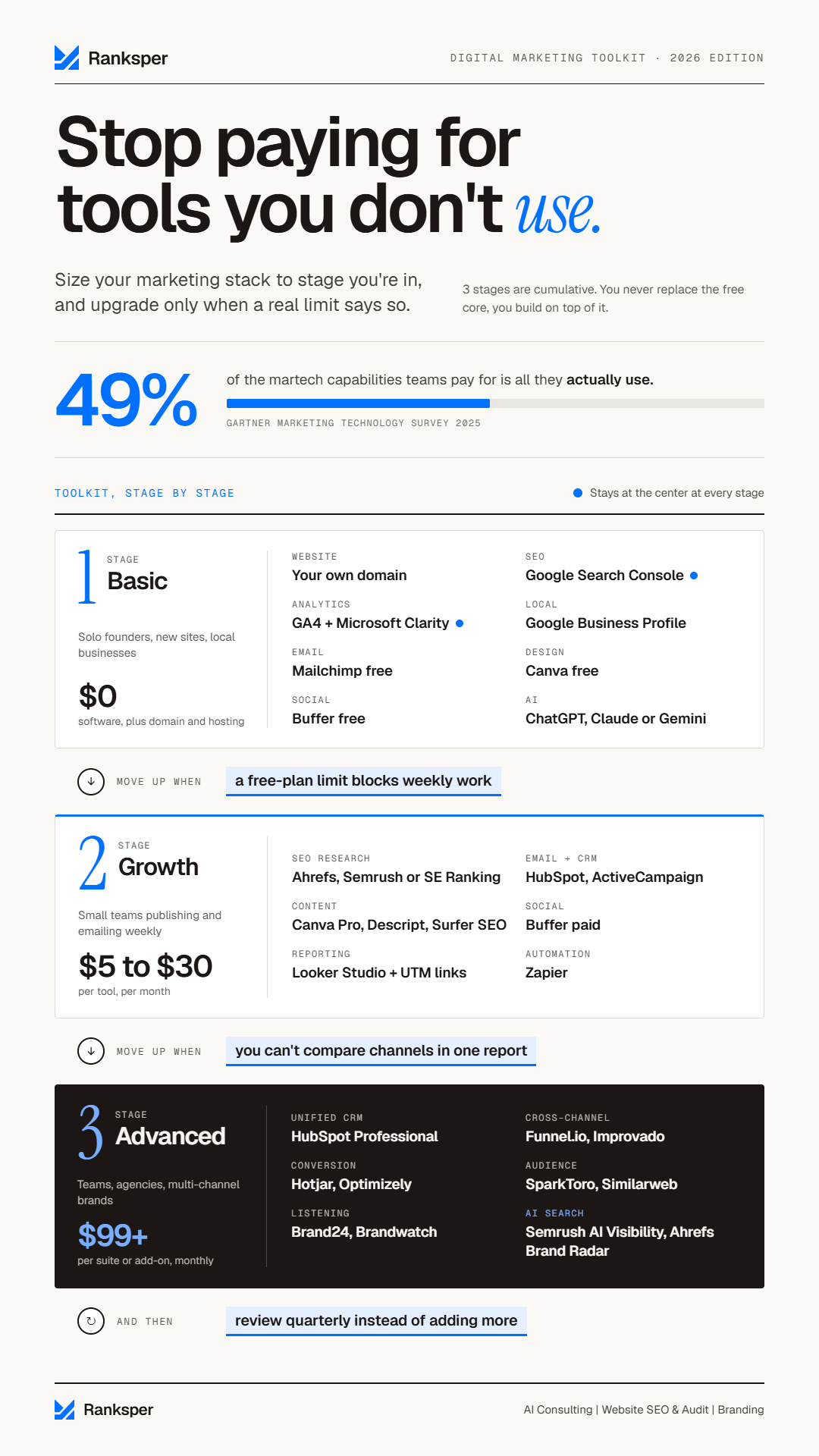
The three stages are cumulative. You don’t replace the free core when you grow. You build on top of it. Search Console and GA4 stay at the center of the stack at every stage, because they’re the two sources that report what actually happened on your site and in Google Search.
| Stage | Who it fits | Cost profile (2026 list prices) | Move up when |
|---|---|---|---|
| Basic | Solo founders, new sites, local businesses | $0 in software; you pay for domain and hosting | A free-plan limit blocks weekly work |
| Growth | Small teams publishing and emailing weekly | Starter tiers, about $5 to $30 per tool monthly | You can’t compare channels in one report |
| Advanced | Teams, agencies, multi-channel brands | Suite plans and add-ons from about $99 monthly each | Review quarterly instead of adding |
The growth range comes from entry pricing on tools covered below, such as Buffer at $5 per channel, Mailchimp at $10, and Ahrefs Starter at $29 a month. The advanced figure reflects add-ons like Semrush’s AI Visibility Toolkit, sold from $99 a month. Prices change often, so treat them as a sizing guide and confirm on each vendor’s pricing page.
Stage 1: Basic toolkit built on free marketing tools
What small business marketing tools do you need first?
- A website on your own domain
- Google Search Console
- Google Analytics 4, plus Microsoft Clarity
- Google Business Profile (for local businesses)
- A free email marketing plan
- Canva’s free plan
- A free social media scheduler
- One general AI assistant
Every item on that list except hosting is free. Here’s what each one does and the limit that tells you it’s time to pay.
A website on your own domain. Every other tool sends people somewhere. If that somewhere is a social profile, the platform owns the relationship and the data. A WordPress site or a builder site on your own domain is the one real cost in Stage 1. If you’re setting one up now, Hostinger’s hosting plans include its website builder, a free domain for the first year, professional email addresses, and SSL, which also notes the trade-offs: no free plan and limited third-party integrations. (Disclosure: Ranksper is a certified Hostinger partner, and this is our referral link.) Whatever you build on, run it through PageSpeed Insights for speed and mobile issues.
Google Search Console. It shows the queries you appear for, your clicks and impressions, and any indexing errors. For an existing site, it’s also the best free keyword research tool you have: queries where you already get impressions on page two but few clicks are the cheapest wins available. Our guide to keyword research fundamentals walks through how to mine that report.
Google Analytics 4 and Microsoft Clarity. GA4 tells you where visitors came from and whether they completed a key event, like a form submission or a call click. Set those key events up on day one, or GA4 will report traffic and nothing else. Microsoft Clarity adds free heatmaps and session recordings, so you can watch where visitors get stuck.
Google Business Profile. For a business that serves a local area, this profile is what appears in Google Maps and local results, so customers often see it before they see your website. Reviews, hours, photos, and service categories all live here. Our local SEO blueprint covers the setup in detail.
A free email plan. Email is the one channel on this list where you own the audience. Mailchimp’s free plan covers up to 250 contacts and 500 sends a month. HubSpot’s free email tool allows up to 2,000 sends a month and connects to its free CRM. Klaviyo’s free plan (250 contacts) fits ecommerce stores. Upgrade when you hit the contact cap or need an automated welcome sequence.
Canva’s free plan. Templates for every social format, simple video, and presentations, with no design background needed. Upgrade to Pro when you need premium templates, stock assets, or more of its AI features across a team.
A free social scheduler. Buffer’s free plan covers three channels with ten scheduled posts per channel. Upgrade when you add a fourth channel or want to batch more than a week or two ahead.
One AI assistant. ChatGPT, Claude, or Gemini on a free tier is enough to draft posts, summarize reviews, and outline content. Pick one and learn it well before adding anything else. The AI section below covers what to add after that.
You’ve outgrown Stage 1 when a free-plan limit blocks work you do every week. Not when a vendor email tells you you’re ready.
Stage 2: Growth toolkit for weekly publishing and email
Stage 2 is where most wasted spend happens, because every category now has a paid tier that sounds essential. Add a tool only when it removes a bottleneck you can name out loud.
SEO and keyword research tools
Upgrade beyond Search Console when you need data on keywords you don’t rank for yet, or on what competitors rank for. Ahrefs offers a set of free SEO tools and a Starter plan at $29 a month. Semrush and SE Ranking are the other common choices. Pick one. Their core datasets overlap heavily, so a second subscription mostly buys a second opinion. We compare the options by use case in our SEO toolkit breakdown.
Content creation tools for digital marketing
Canva Pro covers most visual volume. Descript lets you edit audio and video by editing the transcript, so trimming a podcast or webinar works like editing a document. Gamma turns an outline into a slide deck. Hemingway Editor flags long, hard-to-read sentences for free.
For search-driven content, optimization tools like Surfer SEO and Clearscope compare your draft against pages that already rank and suggest terms, headings, and length. Use them as a coverage checklist, not a score to chase. They measure how similar you are to what ranks, and a draft that only matches the top results has nothing new to offer. Our content creation guide covers the process these tools plug into.
Email automation and CRM
Upgrade when you hit a free contact cap or want your first automated sequence. HubSpot’s Marketing Hub Starter begins at $9 per seat per month, ActiveCampaign starts at $15 a month with goal-based automations that skip steps once a contact converts, and Klaviyo starts at $20 a month for ecommerce flows like abandoned carts.
One rule matters more than the brand you pick: your email platform must either be your CRM or sync with it automatically. Manual CSV exports between the two are where leads go missing. Before a big send, run a test email through Mail Tester to check your spam score for free.
Content marketing analytics
The content marketing tool most small teams skip is measurement. Three free steps fix most of it:
- Link Search Console to GA4, so search queries and on-site behavior sit in one place.
- Tag every email, social, and partner link with UTM parameters using Google’s Campaign URL Builder, so that traffic doesn’t get lumped into “direct” or “unassigned.”
- Build a one-page Looker Studio dashboard showing organic clicks, engaged sessions, and key events per piece of content.
That dashboard is what tells you which posts produce leads and which only produce traffic.
Marketing plan tools
A shared calendar prevents most missed deadlines. Trello boards work well for content calendars, Notion or Google Sheets work for campaign briefs and editorial plans, and Coggle is handy for mapping a campaign or topic cluster visually. Upgrade to a dedicated project management tool only when several people need approval steps.
Paid advertising
Google Ads and Meta Ads Manager are free to use; you pay only for ad spend. Google Ads’ Keyword Planner also gives you search volume ranges, which is useful even if you never run a campaign. LinkedIn Campaign Manager is the B2B equivalent. Third-party PPC tools only make sense once your spend justifies daily optimization.
Automation
Zapier connects your tools without code. Its free plan is limited to two-step automations, and paid plans start at $19.99 a month. The trigger to upgrade: you notice yourself doing the same copy-paste task every week, such as moving new form submissions into your CRM and alerting sales. Automate processes that are already stable. Automating a messy process just makes the mess run faster.
Stage 3: Advanced toolkit for multi-channel teams
Advanced tools pay off when you have enough people or data that coordination is the bottleneck. Before that, they mostly add dashboards nobody checks.
| Need | Example tools | Add it when |
|---|---|---|
| Unified CRM and automation | HubSpot Professional, ActiveCampaign Plus | Three or more people work the same leads |
| Cross-channel reporting | Funnel.io, Improvado | Weekly reports take hours of exports |
| Conversion optimization | Hotjar, Optimizely, Unbounce | Traffic is steady but conversions stall |
| Audience research | SparkToro, Similarweb | You’re entering a new segment |
| Social listening | Brandwatch, Brand24, Sprout Social | Mentions outpace what you can read |
| AI search visibility | Semrush AI Visibility Toolkit, Ahrefs Brand Radar, Profound | Buyers ask AI assistants about your category |
AI search visibility is the newest line on that table. Chiefmartec’s 2026 landscape lists AEO and GEO among the categories where growth is accelerating, and both Semrush and Ahrefs now track how often assistants like ChatGPT, Gemini, and Perplexity mention your brand.
Before you pay for a tracker, run the free version by hand. Ask ChatGPT, Gemini, and Perplexity the ten questions your buyers ask, and write down which brands get named and which pages get cited. If competitors show up and you don’t, you’ve found a content gap, and a tracker will help you monitor the fix. If nobody in your category shows up yet, the tracker can wait.
Should you buy an all-in-one suite instead?
The strongest case against stage-by-stage building is the suite. HubSpot or Semrush One replaces several tools with one login, one dataset, and far fewer integrations to break. That advantage is real.
It holds under two conditions: three or more people work from the same customer records, or you’re maintaining a pile of automations whose only job is keeping separate tools in sync. For a solo operator or a two-person team, a suite’s paid tier usually charges for capabilities you won’t touch for a year.
The test is simple. Price the suite against the tools it replaces at the size you expect to be in 12 months, then list the features you’d actually use in month one. If that list covers less than half of what you’re paying for, you’re buying your way into Gartner’s 49%.
AI marketing tools: which ones are worth it at each stage?
The AI marketing tools worth paying for in 2026 come in a set order. First, one general assistant such as ChatGPT, Claude, or Gemini. Second, the AI features already built into tools you pay for, like Canva, Buffer, or HubSpot. Third, standalone AI tools, but only for a job your assistant can’t do, such as video generation or an on-site chatbot.
That order comes from the gap between adoption and proof. Social Media Examiner’s 2026 survey of 681 marketers found 73% now use AI daily. Yet in Jasper’s 2026 survey of 1,400 marketers, only 41% said they can measure the ROI of their AI investments, down from 49% the year before. At the more ambitious end, 45% of martech leaders running AI agents told Gartner that vendor-offered agents don’t meet expectations of promised business performance. Using AI is no longer the differentiator. Buying it for a job you can measure is.
| AI job | Example tools | Stage | Watch out for |
|---|---|---|---|
| Drafting and research | ChatGPT, Claude, Gemini, Perplexity | Basic | Verify every fact and figure |
| Design | Canva AI, Adobe Photoshop | Basic to growth | Generic output without brand assets |
| Social copy variations | Buffer AI Assistant, Sprout Social AI Assist | Growth | Identical tone on every channel |
| SEO content optimization | Surfer SEO, Clearscope, Writesonic | Growth | Scores reward sameness, not insight |
| Brand Voice copy at scale | Jasper | Growth to advanced | Needs a real voice guide first |
| Video and audio | Google Veo, Descript, HeyGen, Opus Clip, ElevenLabs | Growth | Watermarks and rights vary by plan |
| Presentations | Gamma | Basic to growth | First drafts need heavy editing |
| Website chatbot | Chatbase, Intercom Fin | Growth to advanced | Wrong answers from outdated source content |
How you use these tools matters more than which ones you pick. Give the assistant your context before asking for output: your voice guide, real customer questions, and examples of past content that performed. Keep a human edit on anything that gets published, because AI output is a first draft that states guesses as confidently as facts. And pick one number to track before you start, such as hours per blog post or first-response time on chat, so you can tell whether the tool paid for itself.
How to choose digital marketing tools: 5 questions
- Name the job and what it costs you today in hours or leads.
- Check that it connects to your website, analytics, and contact list.
- Confirm you can export your data in a standard format.
- Price it at your expected size 12 months from now.
- Assign one owner and list the features you’ll use in month one.
Job. If you can’t name the bottleneck, you’re shopping, not solving. “We spend four hours every Monday building the social calendar” is a job. “We should probably have a social tool” isn’t.
Connection. A tool that can’t pass data to your analytics, CRM, or email list creates a second version of the truth. Check for a native integration first, then a Zapier connector, and treat “export to CSV” as a last resort.
Exit. This is the question nobody asks, and the 2026 landscape explains why it matters. Chiefmartec counted 1,488 products added and 1,367 removed in one year, and noted that content marketing’s AI boom is already shaking out. Before you commit, confirm you can export your contacts, content, and reports. The tools that make leaving hard are the expensive ones, whatever their monthly price.
Price at scale. Email platforms price by contacts, social tools by channel, SEO tools by credits, and CRMs by seat. A $10 plan can become a $100 plan a year in without any change on your part except growth. Model month 12, not month one.
Owner. Every tool needs one person who knows it well enough to use more than the basics. A tool with no owner becomes shelfware, and shelfware is how teams end up using half of what they pay for.
Score each question 0, 1, or 2. A total of 8 to 10 means buy it, though move to annual billing only after a month of real use. A score of 6 or 7 means run a trial with a written success metric. Five or below means skip it for now.
Here’s how that plays out for a hypothetical three-person bookkeeping firm. A social listening tool scores 4: no real bottleneck (they get a handful of mentions a month), a partial integration, good export, rising cost, and no owner. Skip. An email automation tool for a tax-season reminder sequence scores 9: a clear job that currently eats a staff member’s week, a native CRM sync, full export, predictable pricing at their list size, and an obvious owner. Buy.
How to use marketing tools without building tool sprawl
Add one tool per month at most. For each one, finish the setup, connect it to your analytics, and write a one-paragraph note on how your team uses it. Review it at 30 days against the success metric you set before the trial.
Then audit the whole stack every quarter. Gartner advises martech leaders to revisit their roadmaps at least quarterly, and a small business version takes an hour. For every tool, note the owner, the last login, the features in use, the monthly cost, and whether the product still exists in the form you bought. Cancel anything with no owner, or anything nobody has opened in 60 days.
Tools also vanish or change underneath you. Google retired its Mobile-Friendly Test and Search Console’s Mobile Usability report on December 1, 2023, and pointed site owners to Lighthouse instead. Some toolkits still ranking for this topic link to the retired tool. A quarterly check catches that kind of rot before it costs you a missed issue.
Free resources for digital marketers who want to stay current
Tools change faster than any list, including this one. These online marketing resources are free and worth keeping on your radar:
- Google Skillshop: free, regularly updated courses on GA4 and Google Ads.
- HubSpot Academy: free certifications in inbound, email, and content marketing.
- Think with Google: research reports and case studies, filterable by region.
- Chiefmartec’s State of Martech report: an annual, free, ungated analysis of which tool categories are growing or shrinking.
- Google Search Central blog: official announcements when Google launches, changes, or retires a tool.
- Gartner’s newsroom: free press summaries of its marketing technology surveys.
Frequently asked questions
Are free marketing tools enough for a small business?
Free marketing tools cover the core jobs for most new and local businesses: Google Search Console, GA4, Google Business Profile, a free email plan, Canva, and a free social scheduler. Your only unavoidable cost is a domain and hosting. Move to paid tools when a free-plan limit, such as a 250-contact email cap, blocks work you do every week.
What are the must-have digital marketing tools in 2026?
The must-have digital marketing tools in 2026 are a website on your own domain, Google Search Console, Google Analytics 4, an email marketing platform, a social media scheduler, a design tool like Canva, and one AI assistant. Local businesses should add Google Business Profile. Everything else should wait until a specific bottleneck justifies it.
Which AI tool is best for digital marketing?
No single AI tool is best for digital marketing. Start with one general assistant, such as ChatGPT, Claude, or Gemini, for drafting and research. Then use the AI features already built into tools you pay for. Add a standalone AI tool only for a job the assistant can’t handle, like video generation or a website chatbot.
Do I need a paid SEO tool?
You don’t need a paid SEO tool at the start. Google Search Console shows the queries you rank for, your clicks, and indexing problems for free. Upgrade to Ahrefs, Semrush, or SE Ranking when you need keyword data for terms you don’t rank for yet, or want to see which keywords and pages drive competitors’ traffic.
How often should you review your digital marketing toolkit?
Review your digital marketing toolkit every quarter. List each tool’s owner, last login, features in use, and monthly cost, and cancel anything without an owner or unused for 60 days. Gartner recommends marketing leaders revisit their martech roadmaps at least quarterly, and the same rhythm works for a small business stack.
Build the toolkit for the stage you’re in
A digital marketing toolkit earns its cost when every tool maps to a job you do each week and a number you track. Anything else is a subscription waiting to be forgotten.
- Set up the eight free core tools this week, starting with Search Console and GA4 key events.
- Write down the free-plan limit you expect to hit first, and when.
- Score every paid tool against the five questions before its trial ends.
- Put a one-hour quarterly toolkit audit on your calendar now.
If you’d like help deciding where AI belongs in your marketing workflow and which tasks are worth automating, our AI consulting team can map it with you.

